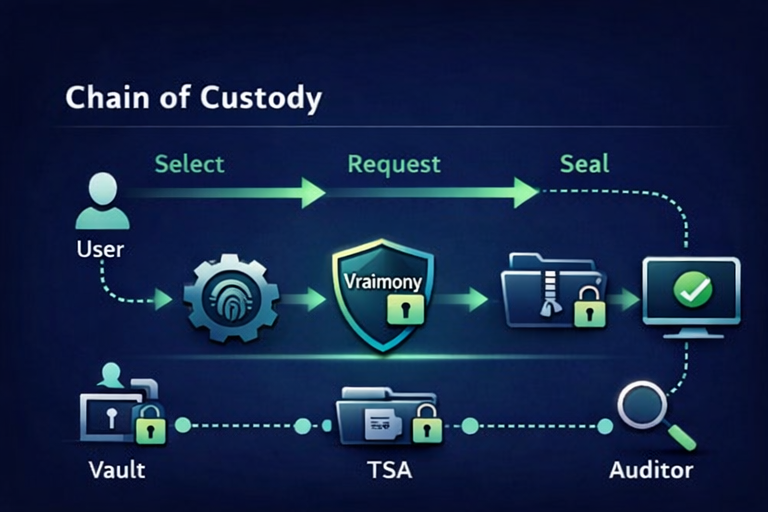
Use in Google Sheets
Use the manual setup path when your team already works in Google Sheets and wants a familiar starting surface without connecting any Google account to Vraimony.
This page helps buyers understand what each tool does, who it is for, and what happens after download. Installable tools stay separate from the templates entry layer.
Vraimony tools are helper-sized on purpose. Packs carry the operational outcome; downloads make the workflow clearer, lighter, and easier to start.
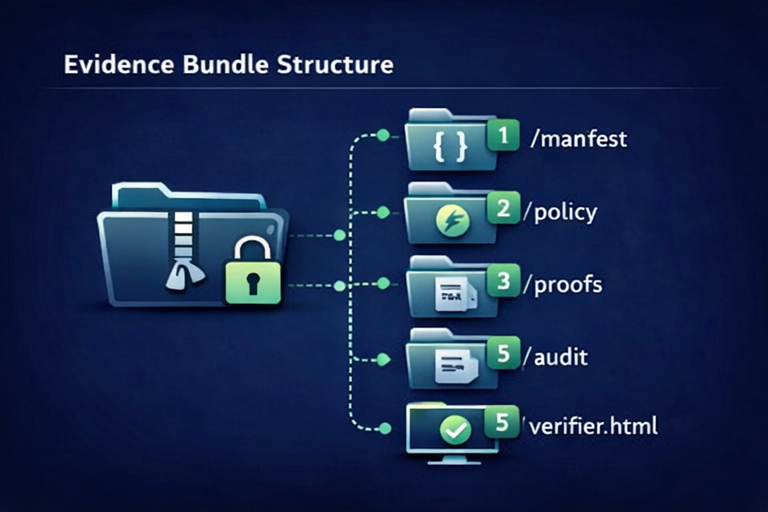
Start with the WordPress Plugin when order disputes, delivery proof, or admin-side evidence work begins inside your site.
Start with the Browser Extension when operators keep checking packages, links, or evidence context directly in the browser.
Start with the Verify Widget when you want a clean read-only verification path on a portal, site, or handoff page.
Start with the Word Add-in when reviews already happen inside documents and you want a lighter helper there.
Start with the CLI / Local Verify when a browser-first path is not the right fit.
Start with Free Operational Templates when your team already works in sheets and wants a CSV-first entry path before packaging.
These templates work without Vraimony. Vraimony adds packaging, verification, reusable outputs, and clearer review paths. No tracking. No lock-in. Google Sheets is optional.
Use the manual setup path when your team already works in Google Sheets and wants a familiar starting surface without connecting any Google account to Vraimony.
Use CSV as the canonical portable path. Keep it local, import it elsewhere, or replace the source tool later without breaking the concept.
Turn the record path into a summary sheet, proof card, structured bundle, structured data export (JSON / ERF), and a read-only verification path.
Start from a familiar record.
Keep the source portable.
Prepare a cleaner output path.
Make review easier for the next step.
Keep structured export portable and verifiable.
Use templates when you need a simple starting surface. Use packs when the real problem is operational clarity, proof reuse, receiver understanding, or third-party-ready packaging.
ERF turns ordinary records into portable, review-ready evidence outputs.
Each card below shows a simple real-world example, what you get, and how the tool is used. This keeps buying and downloading simple.
Stores
Real example: a WooCommerce merchant wants cleaner order evidence when a customer disputes delivery.
What you get: a store-side helper that keeps evidence work closer to the admin workflow instead of scattered across email and screenshots.
How it is used: install the plugin in WordPress, connect it to the right pack flow, and use it as the website-side helper for proof preparation.
Browser helper
Real example: a support operator keeps opening package links and wants a repeatable, read-only verify helper in the browser toolbar.
What you get: a quick browser-side helper for checks, context, and official package identity review.
How it is used: load the extension, pin it, and open it when you need a fast verification-oriented helper.
Sites and portals
Real example: a team wants partners or customers to verify a proof path on a site page without sending them into a heavier portal.
What you get: an iframe-first verification surface designed for read-only inspection.
How it is used: open the guide, place the widget where visitors need verification, and keep the rest of the workflow outside the widget.
Document teams
Real example: a reviewer works in Microsoft Word and wants a lighter helper without leaving the document flow for every small check.
What you get: a document-side helper with manifest-based deployment and Word-first review support.
How it is used: deploy the manifest, open the add-in in Word, and use it as a helper during review and packaging work.
Local verification
Real example: a technical operator wants a local check path on a controlled machine instead of relying on a browser.
What you get: a local-first helper that keeps verification simple and direct.
How it is used: download the CLI, run local checks, and use it when browser-side flows are not the best fit.
Developers
Real example: a developer wants to add local helper logic to an internal tool without rebuilding verification-facing pieces from scratch.
What you get: lightweight local helper logic for developer-controlled workflows.
How it is used: extract the SDK in a sandbox, test locally, and keep the integration helper-sized.
Do not start from the ZIP alone. Open the matching guide first so you know what the tool is for and what it is not for.
Each download is narrow by design. Pick the tool that matches your workflow instead of downloading everything.
Tools help with installation, verification, and distribution. Packs are where the business outcome, proof packaging, or rollout path lives.
READY_TO_SIGN / PENDING FINAL SIGNATURE
This is transparent on purpose. Package identity and source still matter even before final signature is published.